

[read time: 5 mins]
History of Siloed Systems: Solving the N x M Integration Crisis
When we think back to how enterprise software integrations worked before late 2024, engineering teams had to build, test and endlessly patch 30 custom API connectors, because their company wanted three different AI assistants to talk to ten separate operational databases. Every time a vendor update an API endpoint, a pipeline broke. Every time data schema shifted, it triggered a midnight engineering crisis. IT budgets are spent quickly due to this custom “glue code.”
This is the dreaded N x M integration crisis.
Then Anthropic introduced the open-source Model Context Protocol (MCP) and it felt like a lifeline. It is described universally as the “USB-C for AI;” MCP established a standardized JSON-RPC communication layer. Suddenly, instead of building bespoke bridges between every individual tool and model, any AI assistant could discover capabilities, read resources and execute commands across external software through one universal interface. It is a giant leap forward for open system connectivity, yet is also exposed a deeper architectural divide in enterprise software.
The Hidden Reality: Why External Apps Rely on MCP
With MCP being considered as an engineering breakthrough, here is why enterprise companies are suggested to ask questions when a vendor boasts about building an MCP server for their product.
When an enterprise application lives outside your primary CRM database, it is, by definition, an isolated data silo. And for these off-platform software vendors, MCP isn’t an optional luxury; it is an architectural survival wire. They are forced to rely on MCP to patch over three fundamental limitations:
- Protocol Translation: Because off-platform tools do not speak your CRM’s native data language, they must deploy MCP servers as external translators just to expose their data structures to an AI agent.
- Remote Context Retrieval: Off-platform applications do not share your CRM’s live memory space. Every single time an AI agent needs a piece of context, it must launch a remote call over the internet to fetch that data through an MCP server and shove it into the model’s context window.
When you peel back the technical layers, the truth becomes undeniable: off-platform vendors need MCP because they are on the outside looking into a CRM; and they are passing the latency, token costs, and maintenance overhead directly onto your balance sheet, your CFOs bottom line.
The Native Advantage: Why 100% Native CRM Architecture Wins
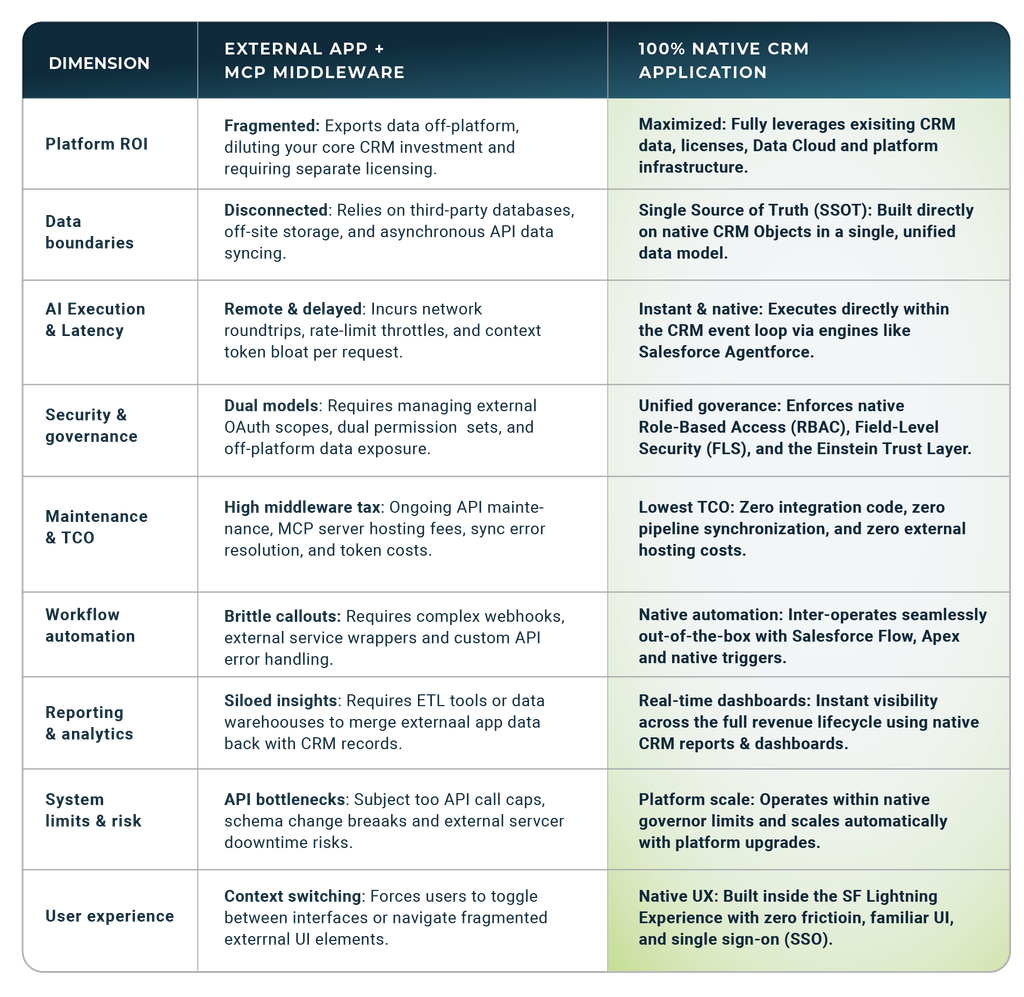
If your enterprise has invested heavily in Salesforce (unifying customer profiles, configuring security roles, and deploying Agentforce) buying off-platform software creates a glaring ROI paradox: Why invest in the world’s leading CRM platform only to export data out of it and pay for external software silos?
Every time you deploy an off-platform tool, you strip away the primary benefit of a centralized CRM: a single source of truth. When you adopt 100% Salesforce native applications (built directly inside Salesforce’s Customer data layer), you eliminate integration bridges entirely and capitalize on your existing infrastructure.
Why 100% Native Architecture Wins
- Maximizes your Salesforce platform ROI: Every custom object, validation rule, flow, and permission set, you have configured applies automatically. Native apps leverage your existing investment in Data Cloud and the Einstein Trust Layer without forcing you to reconstruct access controls in an external database.
- Zero translation layer: Native apps share the CRM’s database schema out of the box. AI engines like Agentforce don’t need an MCP server, API field mapping, or JSON translation to read CPQ quotes, subscription schedules, or billing records, or renewals (they execute actions directly on core CRM objects and extending them in real time).
- Instant execution without rate limits: Because execution happens entirely inside the Salesforce application server, processes run instantly. You eliminate remote API network latency, outbound bandwidth throttles, and third-party server dependencies.
- Drastically lower Total Cost of Ownership (TCO): Moving data off-platform forces you to pay a “middleware tax;” external hosting fees, continuous API maintenance, multi-system compliance monitoring, and heavy LLM token markups caused by fetching remote context over the web.
Comparing the Architectures
Would You Like to Learn More?
Are you evaluating how AI truly fits into your revenue tech stack, or are you accidentally building an expensive web of middleware, vibe code, and MCPs that creates more friction and cost than value? Choosing between federated MCP integrations and 100% native architecture comes down to a few decisive operational realities:
- The Financial & Technical Drain: How much are you currently spending on API maintenance, middleware connectors, custom sync scripts, and third-party token markups just to keep disconnected tools talking to your Salesforce CRM?
- The Speed Bottleneck: Is data fragmentation and remote context retrieval slowing down your core revenue operations; from CPQ quoting, contract approvals, to subscription, usage billing, invoicing, payments, and renewals ?
- The AI Capability Gap: Would your AI agents execute faster, reason smarter, and operate safer if they worked directly on your Salesforce CRM and RLM layers in real time; without remote translation layers, latency, or dual-permission headaches?
Experience Native AI for Yourself
It’s time to stop paying the “middleware tax” on off-platform tools that isolate your enterprise data. Discover how a 100% native architecture eliminates data silos, drastically lowers total cost of ownership, and empowers autonomous AI agents to execute revenue workflows directly inside your Salesforce CRM.
Depending on how your team prefers to evaluate new partners and their software, we would like to give you options to choose the path that best fits your workflow:
- Guided Executive Overview: Schedule a Live Demo or request a personalized architecture assessment to see how native AI handles end-to-end revenue lifecycle management in real time.
- Hands-On Builders: Are you a DIY kind of person? Schedule a 90-Minute Self-Implementation Workshop to roll up your sleeves, inspect the native data model, and build and configure native AI revenue workflows step-by-step for your organization.